Then choose from translation, image enhancement, audio conversion & so much more!
Multilingual User Interface
Accessibility
The accessibility feature makes it easier for visually-impaired users to use the station by utilizing the following features:
Magnier—Enlarges part of the screen so the user can see words and images better.
Narrator— A screen narrator reads aloud the text that appears on screen along with any audio descriptions.
High Contrast—Utilizes a high contrast scheme for easier visibility.
The ScanEZ Station multilingual interface allows users to switch on-screen text to one of 21 different languages.
Arabic
Chinese
English
French
German
Persian
Greek
Hebrew
Hindi
Italian
Korean
Polish
Tagalog
Swiss French
Swiss German
Swiss Italian
Vietnamese
Portuguese
Russian
Spanish
Swedish
Translation Services
Breaking Down The Language Barrier
Multilingual Translation Service to Text & Audio – Converts scanned / uploaded documents from one language to another language of the user’s choice. With 100 languages to choose from using either Google or Microsoft Azure Cognitive Services. The converted scans are sent as Microsoft Word file and a translation subset for MP3 audio file conversion that can be sent to any of the ScanEZ “scan to” locations. Our catalogue of languages is constantly growing.
Output Locations
File Formats
ABBYY® Fine Reader – OCR supports 192 recognition languages in all combinations.
Translation Service – Translate a scanned document into one of up to 100 supported languages. The converted scan is sent as a PDF or Word File and a subset of languages for MP3 audio file conversion to any of the destinations above. System-wide annual cost.
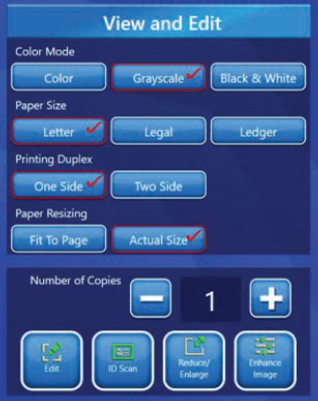
True Copy Function – Provides user with an easy way to utilize the ScanEZ Station as a copier replacement including reduction and enlargement capabilities.
Copy Functions
Automatically straightens image onto paper
Scanned images can be viewed in colour, grayscale and black and white
Automatically view scanned image on different paper sizes
Select single-sided or double-sided output
View Fit-To-Page in real time
Crop and view images
Enlarge or reduce with easy-to-use sliders and quickly view before output
Scan IDs (front and back) and print to a single page
Multiple copies
Editing Capabilities
Resolution – Change the resolution of a scan from standard resolution to high-quality resolution and vice versa
Colour Mode – Scan items in Black & White, Grayscale or Photo Colour
Page Arrange – Drag and drop the pages into the desired order
Fit to Page – Resize the scanned item to fit on a standard A4-size page
Actual Size – Maintain the aspects of the originally scanned item
Horizontal or Vertical Split – Position the division bar at the dividing point to split horizontally or vertically
Simplified Reduction Enlargement
Image Enhancement
VividPix - Patented Technology
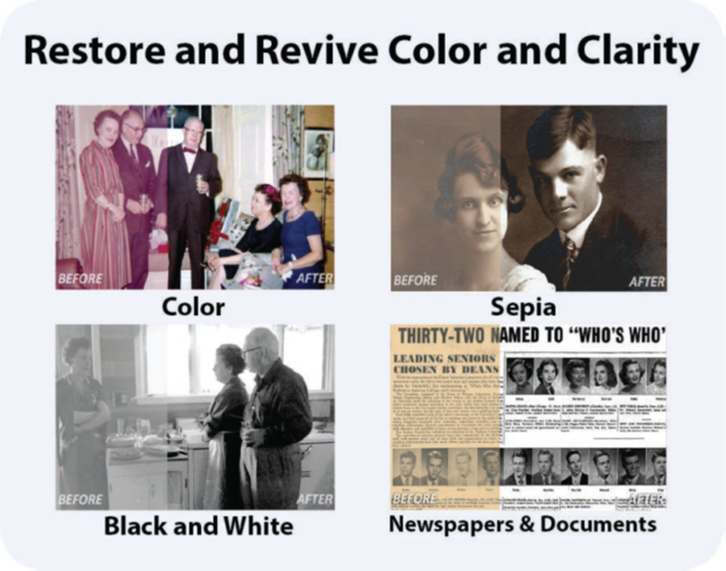
The ScanEZ station applies patented image science to enhance photos, documents, newspaper articles, digital photographs and more. 1-click technology improves your images, restoring and reviving your memories and history.
Old Photos, Newspapers, Documents and Books
• AI (Articial Intelligance) analyzes every image
• Adjusts color, contrast, lightness and sharpness
• Nine color-corrected images are presented to the user to choose from
• The original and restored images are presented side-by-side to review
• The image can now be retuned with easy-to-use sliders
• Automatically adjusts what Adobe manually corrects (with layers and curves)
Available Scanners
Flatbed Scanner – A document can be placed anywhere on the 11” x 17” flatbed, at any angle, and the ScanEZ Station will straighten and x that document. Patented book-edge designed to protect your book’s spine and eliminates blurry or dark imaging in a book’s gutter area.
Sheetfed Scanner – Scan both sides of the page in a single pass at up to 120 pages per minute. Will accommodate maximum paper size of 8.5” x 14” and minimum size as small as ID Cards.
Platform Tools
Web Reporting:
The ScanEZ Station includes a web portal for centralized reporting.
Usage reporting for individual units, selected devices, or your entire ScanEZ fleet
Detailed tracking by scan options, delivery method, file format, and colour settings
Automated report generation with scheduled email delivery (monthly, quarterly, annually, or custom intervals)
Accounting reports to support billing reconciliation and cost tracking
Insights to optimize workflows and equipment deployment
Full access to analytics and reporting tools included at no additional cost throughout the contract term
Management Dashboard:
ScanEZ Remote Access gives you instant access to every ScanEZ Station within your fleet.
Automated email alerts for device failures and system issues, even during power outages
Centralized management of Windows updates and upgrades
Remote scheduling of ScanEZ updates, upgrades, and feature changes
Hardware and software inventory tracking across your fleet
Remote diagnostics, troubleshooting, and issue resolution
Remote staff and user training to support adoption and productivity
Support & Service:
The SurfBox Maintenance Program keeps your ScanEZ Station running with minimal downtime, providing unlimited phone support, staff training, and full coverage of parts, labour, maintenance, and consumables.
Full Warranty Coverage –
Comprehensive hardware and software coverage, extendable for the life of the equipment, with first-year maintenance and support included.
Hardware Maintenance –
Includes same-day or next-day hardware replacement as part of our standard support plan.
Software Maintenance –
Includes all software updates, upgrades, and feature enhancements for the life of the product.
Industry Leading Functionality Included with Every ScanEZ Station
Standard 17” Touchscreen Computer — Commercial Grade AiO Touchscreen computer Intel Core I5, 8GB RAM, Windows 10 Pro, 120 GB SSD Multilingual Interface —easy to use software available in 25 languages.
Enhanced Email Authentication – Gmail, Facebook, Outlook.com, Hotmail, and Office Live. Cloud-Service Authentication— Google, DropBox, Box, OneDrive and Office 365. Smart Copy Functions—with reduction and enlargement.
Flexible Charging — Multi-tiered discounts per output.